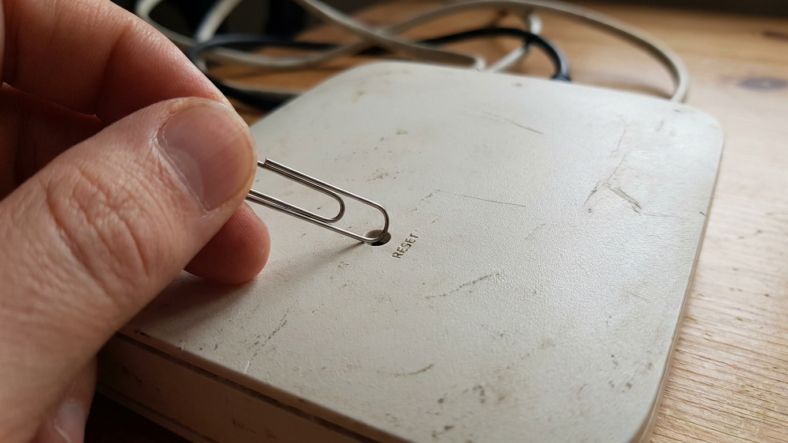


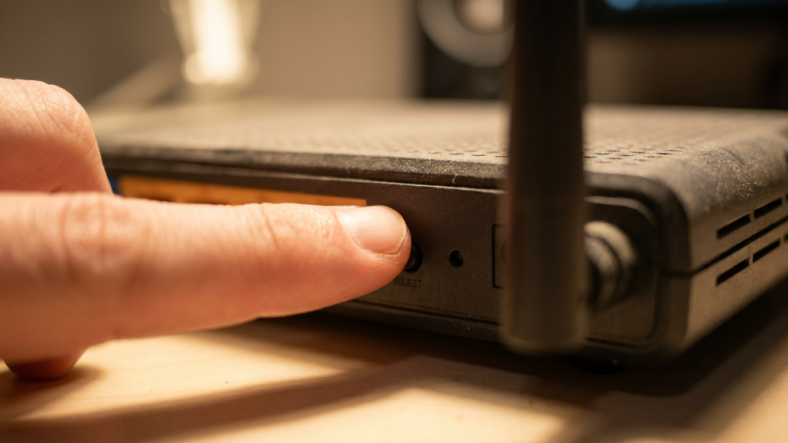
To reset a router to factory settings, find the small recessed reset button on the back or bottom of the unit, usually labeled RESET. Press it with a pin or paperclip and hold for 10 to 30 seconds until the lights flash or shut off, then release. The router reboots on its own and comes back with the settings it shipped with, meaning you will need to reconfigure your wifi network name, password, and admin login from scratch.
This is different from a soft reboot, which power cycles the router and keeps every setting intact. If your goal is fixing a slow connection without wiping anything, resetting your router without losing your wifi settings is the faster route. A hard factory reset is for a misconfigured, locked out, or handed-off device.
What a Factory Reset Actually Wipes
A full factory reset clears everything stored in the router’s configuration memory. That includes your custom wifi network name (SSID) and password, any port forwarding rules you set up for gaming or a security camera, custom DNS entries, parental controls, guest network setup, and the admin username and password if you ever changed them from the default.
Every device on your network will drop off and need to reconnect using the default wifi name and password printed on a sticker on the router itself. If you run a separate modem and router, only the router resets. Your modem stays untouched.
Step by Step: Hard Resetting Any Router
Find the tiny recessed hole on the back or underside of the router, usually near the power port. It sits flush with the casing so you need a straightened paperclip, a SIM eject tool, or a pen tip to reach it. Some units pair reset with the WPS button, so check for a label that says RESET specifically before pressing.
Insert the pin and press straight in until you feel slight resistance. Hold for 10 to 30 seconds and watch the LED lights flicker, go dark, or cycle through colors, that is your signal the memory is clearing. Release, then leave the router alone for 60 to 90 seconds while it reboots and rebuilds its default configuration.
Connect to the default network name printed on the device label and log into the admin panel with the default credentials to rebuild your wifi name, password, and any other settings you had before.
The 30-30-30 Method for Stubborn Routers
Older or unusually stubborn routers sometimes will not clear on a single hold. The 30-30-30 method: hold reset for 30 seconds while powered on, unplug the power while still holding it for another 30 seconds, then plug back in while holding it for a final 30 seconds.
Save this for routers that still show old settings or a locked admin password after a normal reset. If you are shopping for a replacement instead, a wifi router buying guide can help you figure out which specs actually matter.
When You Actually Need a Factory Reset
Reach for a hard reset when you have forgotten the admin password, when the router misbehaves after a botched firmware update, or when you are selling or returning the device and need to clear your personal data first. It also helps when a previous owner or ISP technician left behind settings you cannot identify or undo manually.
Router Factory Reset: Common Questions
Will a factory reset fix a slow connection? Sometimes, but a simple power cycle solves most speed issues without wiping your settings. Save the factory reset for configuration problems, not general slowness.
Do I need to reset my modem too? No, unless the modem itself is having connection problems. Router and modem resets are separate actions on separate devices.
How long until wifi works again after a reset? Most routers are back online within two to three minutes, though you will need a few more minutes to reconnect devices and rebuild any custom settings.

Adriana Mercado is a writer who explores the intersection of science, futurism, and storytelling. She covers simulation theory, emerging technologies, strange biological discoveries, and the worlds created in sci-fi and fantasy. Her work focuses on curiosity, clear explanations, and uncovering ideas that sit just beyond the mainstream.